NovaUnit
Made in Singapore, for Singapore condos

Condo management with AI agents that do the legwork.

One app for residents, one command centre for your managing agent. NovaUnit's agents watch requests, chase vendors, read every document and prepare the paperwork. Your team checks and approves.

admin.novaunit.co
NovaUnit command centre: insights, numbers for the building and one list of what needs attention
Built in Singapore
iOS and Android app
BSMA-aware finance
PDPA-minded design
AI that you approve

From WhatsApp threads to one list of what needs you.

Managing agents juggle chat groups, email, paper forms and spreadsheets. Things slip: a resident's follow-up, a renewal date, an overdue levy. NovaUnit brings it into one place and does the follow-up for you.

Before

Everything is somewhere

  • Requests buried in WhatsApp
  • Bookings by phone and paper
  • Levies and arrears in spreadsheets
  • Contract renewals remembered, or not
The switch

Residents get an app, your team gets a command centre

  • Strata roll imported in minutes
  • Residents join from the App Store or Google Play
  • Requests, bookings and applications flow in, structured
After

Agents follow up, you decide

  • Urgent issues and resident replies at the top
  • Patterns spotted before residents complain twice
  • Quotes collected and compared for you
  • Deadlines, levies and inspections never forgotten
Meet your agents

AI that works through the steps, not just answers questions.

Each NovaUnit agent runs a real workflow from start to finish: it gathers what it needs, does the work, and stops where a person should decide.

Procurement agent

Re-tenders contracts in days, not weeks

  1. Spots the renewal. Every contract ending within 90 days is flagged.
  2. Finds vendors. Searches the web for suitable Singapore companies, checks that their websites exist and finds a contact email.
  3. Writes the request. Drafts a quotation request from your contract and recent issues; never shares the current price.
  4. You approve and send. One email per vendor from NovaUnit's mailbox.
  5. Reads every reply. Sorts quotes, questions and declines; pulls out price, term, response time and anything missing.
  6. Chases and compares. Drafts follow-ups and lines the quotes up side by side.
  7. You award. The new contract is filled in on the register and the other vendors get a polite note.
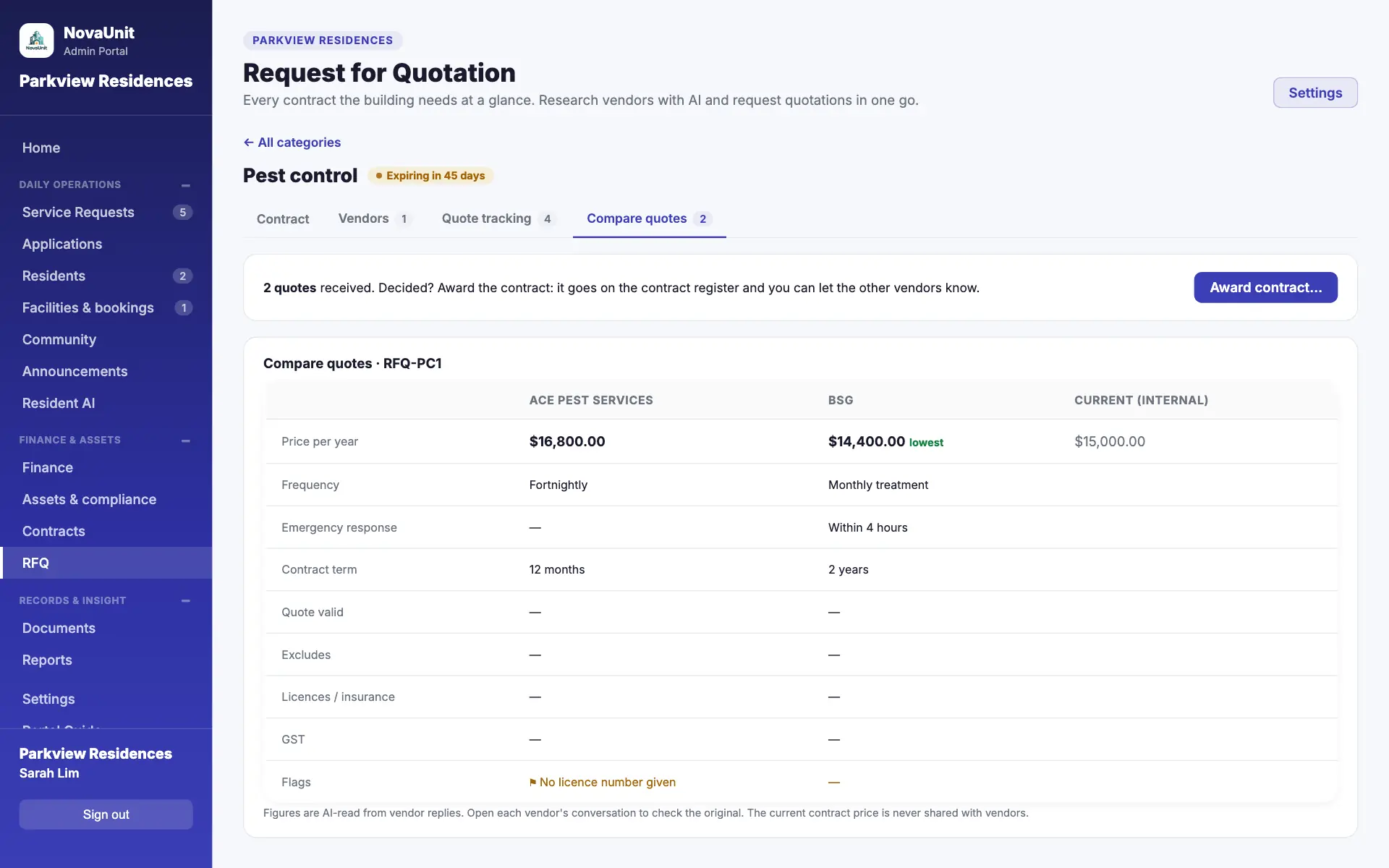
Quotes from two vendors compared side by side, with the lowest price marked

Insights agent

Reviews the building every night

  1. Reads 90 days of requests, your contracts and documents.
  2. Finds real patterns: clusters by block, repeat faults, sudden spikes. One complaint is never a "trend".
  3. Checks the contract, quotes the vendor's SLA and drafts the email to them.
  4. You review in the morning and send, or dismiss.

Document agent

Reads every file so you don't have to

  1. Reads uploads: PDFs, photos, Word and Excel, plus certificates, policies and application documents.
  2. Captures contracts into the register, with renewal reminders.
  3. Answers questions about your documents, citing the file.
  4. You confirm every captured contract.

Resident assistant

"Ask the Building" in the app answers pool hours, BBQ rules and move-in procedures, only from what management chooses to share.

Reply copilot

Drafts a professional reply to any request from the conversation, the unit's history and your building's rules. Edit it, then send.

You stay in control

Agents draft; people approve. Nothing about money goes out without a person confirming it.

Every AI result is labelled, so your team knows what to check.

AI is switched on per building, with a monthly allowance to keep costs predictable.

Command centre

Everything that needs a person, most urgent first.

Home is one list for the whole building, so your team starts the day knowing exactly what to do.

  • Urgent first. Lift entrapments, floods, burst pipes and power cuts are flagged automatically with a one-day target.
  • Resident replies stand out and reopen a closed request, so no follow-up is missed.
  • Targets per category, with days left or over, set by each building.
  • One list: requests, approvals, bookings, deposits, arrears steps, AGM and filing deadlines, inspections, renewals, quotations. Snooze with a note, or dismiss.
A service request with the resident's reply, an internal note and the reply box with Suggest reply
The platform

Everything your MCST runs, in one place.

Service requests

Categorised requests with photos or video, a live conversation with the resident, push notifications, internal notes only your team sees, and targets per category.

Applications

Keycards and transponders, move-ins and renovations: approval, fees, deposits held in trust, renovation permits, an item register and the daily guard-house list.

Finance

Levies by share value with PayNow QR invoices, bank statement import, receipts and statements, statutory interest and the s40 / s43 arrears steps, recurring expenses, budget and AGM pack, eligible voters, s47 certificates and an auditor pack.

Arrears with principal, interest, days overdue and the next legal step for each unit

Assets and compliance

Asset register and servicing, sinking fund adequacy, a Singapore compliance calendar (PSI, lift permit, fire certificate, water tanks) with certificates, and an insurance register.

Facilities and bookings

Calendar booking in the app, monthly limits, payment deadlines, fees into the accounts and deposits refunded or kept with a reason.

Documents and contracts

One library for by-laws, minutes, certificates and policies, a contract register with renewal reminders, and answers from your documents with citations.

Reports

Requests, bookings, finance and vendors with trends against the last period, an AI summary, and a PDF or PowerPoint pack for council meetings.

Announcements and community

Notices with push notifications and pinning, and a community board for residents (items for sale, lost and found, recommendations), moderated by management.

The resident app

Residents get answers, not a chat group.

Available on iPhone and Android. Residents register for their unit, and the office approves them.

  • Raise and follow requests
  • Book facilities on a calendar
  • Apply for keycards, moves, renovations
  • Notices with push notifications
  • Ask the Building assistant
  • Community board

Good morning,

Wei Ming

Blk 3 #12-04 · Parkview Residences

Notices

Pinned

Pool maintenance this weekend

Closed Sat 8am–6pm for annual servicing.

AGM notice: 9 Nov

Function room, 7.30pm.

Assistant

Ask the Building

Pool hours, BBQ rules, bin days…

Upcoming booking

BBQ Pit A · Sat 6pm

Confirmed
Built for Singapore

Knows how strata management works here.

AGM deadlines

Notice periods, the voting register's payment cut-off, 15-month rule and BCA filing, tracked on Home.

BSMA finance

Under the Building (Strata Management) Act: interest from day 31 per fund, final demands, s43 steps, s47 certificates.

PayNow invoices

SGQR codes on invoices and statements, with a payment reference per unit.

Statutory inspections

PSI, lift permit to operate, fire certificate, water tanks, gondola: one calendar.

Strata roll import

Every unit's owner and share value from one CSV, checked before saving.

School holidays

MOE holidays flagged on Home, so you expect more bookings, moves and renovations.

Local formats

Unit numbers like Blk 3 #12-04 and Singapore phone numbers, validated.

One building per login

Each login sees one condo, so buildings' data never mixes.

Packages

Start with the core. Add what your building needs.

Every building gets Core. Finance, Assets, AI and Procurement are switched on per building, so you only pay for what you use.

Always included

Core

  • Resident app (iOS, Android)
  • Command centre
  • Service requests
  • Applications: keycards, moves, renovations
  • Facilities and bookings
  • Announcements and community
  • Documents and contracts register
  • Reports
Add-on

Finance

  • Levies and PayNow invoices
  • Payments and bank import
  • Arrears, interest, s43 steps
  • Expenses, recurring costs
  • Budget, AGM pack, voting register
  • s47 certificates, auditor pack
Add-on

Assets

  • Asset register and servicing
  • Sinking fund adequacy
  • Compliance calendar with certificates
  • Insurance register
Add-on

AI

  • Insights agent
  • Document agent
  • Reply copilot
  • Ask the Building for residents
  • Report summaries
  • Monthly fair-use allowance
Add-on

Procurement

  • Procurement agent
  • Vendor research
  • Quotation requests and reply tracking
  • Compare and award

Pricing depends on the number of units and the packages you choose. Contact us for pricing.

Live in days, not months.

  1. 01

    We set up your building

    Units, facilities, your building profile and your team's login.

  2. 02

    Import the strata roll

    Owners and share values from one CSV, plus opening balances if you use Finance.

  3. 03

    Residents join

    They download the app, pick their unit, and you approve them.

  4. 04

    Your agents get to work

    Requests, bookings and applications flow in; the agents start following up.

Questions managing agents ask

Does the AI send things on its own?

No. Agents prepare drafts, comparisons and suggestions; your team approves them. Nothing about money is sent without a person confirming it. Ask the Building answers residents' questions from what management has shared, and quotation requests can be set to send in one click once you're comfortable.

What does the AI read?

Your building's own records: requests and their conversations, contracts, the files in your document library (including documents residents attach to applications), report figures, and vendors' replies to your quotation requests. Vendor research also searches the public web for Singapore suppliers. The resident assistant answers from the information and documents management chooses to share; if management switches on general knowledge, it can also give general guidance, labelled as such. AI is processed by Google Cloud's Vertex AI; see our privacy policy.

Where is our data stored, and is it secure?

NovaUnit runs on Google Cloud (Firebase). The database is in Google's United States region, and photos, videos and documents are stored in Singapore. Each building's data is separated from every other building, admins see only their own condo, and residents see only their own records and what management shares.

Can we start with only some packages?

Yes. Core is always included; Finance, Assets, AI and Procurement are switched on per building. Switching a package off never deletes data, and switching it back on restores everything.

We already have records. Do we start from scratch?

No. Import the strata roll from a CSV, enter opening balances for the funds and any arrears, and upload your existing contracts, by-laws and minutes. The document agent captures contracts from the files.

Which phones do residents need?

Any recent iPhone or Android phone. The NovaUnit app is free for residents on the App Store and Google Play. Your team uses the web portal on a laptop or desktop.

Book a demo

See NovaUnit with your own building in mind.

A 30-minute walkthrough of the resident app, the command centre and the agents. Tell us a little about your buildings and we'll get back to you within one business day.

Prefer email? hello@novabranch.co

We use your details only to arrange the demo. See our privacy policy.